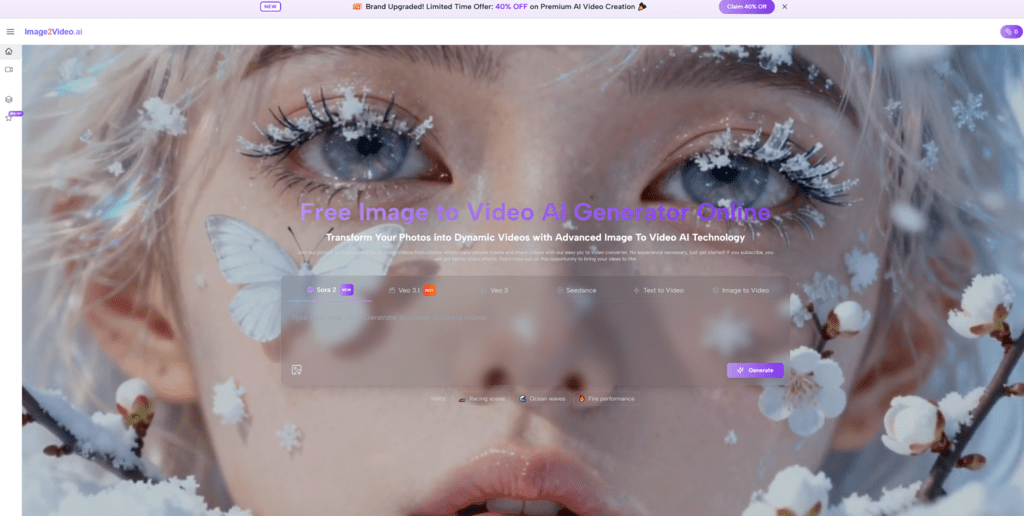
The market for AI video is moving fast, but not every tool solves the same problem. Many people do not need a full production suite. They need a practical way to turn one good still image into a short, usable clip for ads, product pages, social posts, or concept testing. In that context, Image to Video AI stands out because its public product framing stays close to the actual task. Instead of forcing users through a complicated editing mindset, it presents image-led generation as a direct workflow: upload a picture, describe motion, choose a few visible settings, and render a result.
That clarity matters more than many rankings admit. A platform can look impressive on a landing page and still feel inefficient in real work. In my observation, the more useful image-to-video tools tend to share three qualities: they make the entry point obvious, they expose enough controls to guide output, and they do not hide the fact that iteration is part of the process. Good results often come from a second or third attempt, especially when movement, pacing, or subject behavior needs refinement.
This is why a top-ten list is more useful when it evaluates fit rather than hype. Some platforms are better for structured, lightweight generation. Some are stronger for broad creative ecosystems. Others are useful because they combine generation with editing, templates, or team-friendly publishing. The ranking below puts Image2Video first not because every competitor is weak, but because its visible workflow is unusually easy to map onto real image-driven use cases.
What Makes An Image To Video Tool Practical
A good image-to-video product should reduce friction, not simply move it around. If a user has already chosen a strong source image, the main job of the platform is to turn that visual decision into motion with reasonable control and acceptable speed.
The Source Image Already Solves Many Problems
Still images already contain framing, character design, mood, color direction, and composition. That means the best tools do not start from zero. They extend a visual decision that has already been made.
Motion Direction Is The Real Prompting Task
In practice, prompts for image-to-video work best when they describe behavior rather than identity. The image already says who or what is in frame. The prompt usually works better when it focuses on movement, camera style, pace, and atmosphere.
Usability Depends On Visible Constraints
One reason some tools feel easier to trust is that they reveal key settings. Visible choices such as aspect ratio, resolution, frame rate, or generation mode help users understand what the system is actually doing.
Visible Settings Improve Creative Planning
When settings are explicit, creators can think ahead about platform fit. A vertical clip for short-form social content is not the same job as a widescreen product shot or a simple website hero animation.
The Ten Best Image To Video Platforms
Below is a practical ranking for users who want to animate images rather than build an entire video pipeline from scratch.
1. Image2Video
I place Image2Video first because its public structure stays tightly focused on the image-led workflow. The visible product path centers on uploading an image, entering a prompt, choosing settings such as ratio and output quality, and generating a short clip. In my testing logic, that kind of framing is valuable because it reduces interpretive overhead. A user immediately understands what the tool is for.
Its strength is not that it promises to replace all editing software. Its strength is that it treats image animation as a clear standalone task. That is useful for product visuals, social content, quick prototypes, and repurposing approved still assets. A realistic limitation is that, like most generative systems, output quality still depends on prompt discipline and sometimes multiple retries.
2. Runway
Runway remains one of the most established names in AI video. Its advantage is breadth. It supports image-to-video inside a much larger creative environment, which is valuable for users who want generation plus broader workflow options.
The tradeoff is that it can feel like more tool than some users need. For people who only want to animate an image quickly, the larger ecosystem may introduce extra conceptual weight. Still, it remains a serious option for users who expect to scale beyond simple one-shot generation.
3. Luma
Luma is often appealing because it positions AI video creation as a direct, visually driven process. It is especially useful for users who want cinematic-looking movement without starting from a traditional editor mindset.
Its limitation, in my observation, is that users may still need experimentation to align motion style with intent. Like many modern generators, it can produce strong first impressions, but consistency across prompts remains part of the real evaluation.
4. PixVerse
PixVerse has become more visible because it supports both text and image inputs and leans into social-friendly, attention-grabbing outputs. It can be useful for creators who want quick concept expression and a range of effect styles.
The caution here is that a style-rich platform can sometimes encourage spectacle over control. That is not always bad, but it means results may need more selection and curation.
5. Pika
Pika is compelling for users who enjoy experimentation. It has built a reputation around creative, expressive video behaviors and a playful approach to generation. That makes it attractive for short-form content and stylized outputs.
Its weakness for some professional users is predictability. A platform optimized for expressive novelty is not always the same as a platform optimized for repeatable production behavior.
6. Haiper
Haiper deserves attention because it supports image animation and presents itself as a flexible AI video platform. It is useful for users who want to move between text-to-video and image-to-video without changing ecosystems.
Its practical challenge is that broader capability does not automatically mean the smoothest entry point for every user. People with narrow image-to-video needs may still prefer a more focused interface.
7. Canva
Canva is valuable because it meets users where they already work. For teams already using it for design, presentations, or lightweight marketing content, image-to-video is easier to adopt because it sits inside a familiar environment.
The tradeoff is obvious: Canva is an all-in-one platform, not a dedicated frontier video lab. That often means convenience is the main advantage, while deeper generation nuance may be more limited than in specialist tools.
8. VEED
VEED is useful for users who think in terms of content publishing rather than pure model play. It combines creation and editing in a practical way, which can help marketers and solo creators move faster.
However, that same positioning means it may feel more workflow-oriented than model-oriented. Users seeking the most advanced image animation behavior may want to compare outputs carefully.
9. CapCut
CapCut is attractive because it connects AI-assisted creation with an environment many creators already understand. For people producing social clips at scale, that familiarity matters.
Its limitation is that it often serves broader content assembly goals, not just image animation. That can be efficient for some users and distracting for others.
10. InVideo
InVideo rounds out the list because it emphasizes fast, accessible video generation for practical content needs. It is a reasonable choice for users who care more about speed and business utility than deep experimentation.
The main caution is that convenience-first platforms sometimes smooth over the fact that image-to-video still benefits from careful visual direction. Ease of use does not remove the need for judgment.
Quick Comparison Across The Top Ten
| Platform | Best Fit | Main Strength | Main Limitation |
| Image2Video | Fast image-led generation | Clear workflow and visible settings | Short outputs may still need retries |
| Runway | Advanced creative users | Broad tool ecosystem | More complexity than some users need |
| Luma | Cinematic motion tests | Strong visual orientation | Prompt alignment still matters |
| PixVerse | Social-first creators | Fast expressive outputs | Style can outweigh precision |
| Pika | Experimental creators | Playful and creative behavior | Less predictable for repeatable production |
| Haiper | Flexible cross-mode users | Supports multiple creation modes | Less focused than narrow-purpose tools |
| Canva | Design and marketing teams | Familiar workspace integration | Not as specialized for frontier video use |
| VEED | Publishing-focused users | Creation plus editing workflow | Model depth may vary by task |
| CapCut | Social content creators | Familiar editing environment | Broader scope can dilute focus |
| InVideo | Business content speed | Accessible and practical setup | Less emphasis on high-control generation |
How Image2Video Differs From Broader Suites
The reason Image2Video leads this ranking is not simply output claims. It is the way the product defines the job. That definition affects who can use it effectively and how quickly they can get to a useful result.
It Starts From The Right Unit Of Work
Many users already have a finished still image. That image may come from a product shoot, a design mockup, an AI image generator, or a campaign asset library. They do not need a blank creative canvas. They need motion.
It Makes Control Legible Without Becoming Heavy
In my observation, platforms become easier to trust when they expose a few meaningful decisions instead of burying them. Image2Video appears to do this with a lightweight control layer rather than a large editing structure.
It Fits Repurposing Better Than Reinvention
This is especially important in real marketing use. Teams often already have visuals approved by brand, legal, or clients. Being able to animate those visuals is often more useful than generating an entirely new concept from scratch.
Repurposing Approved Assets Saves Time
That workflow reduces approval friction. A still asset that is already accepted can become a short motion asset, which is often easier than restarting production.
A Simple Three Step Working Method
Most people do not need a complicated process to get value from image-to-video tools. A simple method is usually enough.
Step One Choose A Strong Source Image
Start with an image that already communicates the story well. Good composition makes motion decisions easier.
Step Two Describe Motion Rather Than Identity
Later in the article, a second useful reference point is Photo to Video, because the task is not to reinvent the subject. It is to animate what is already there. In practice, prompts work better when they describe camera drift, subject movement, emotional pacing, or environmental motion.
Step Three Compare Two Or Three Variations
Do not assume the first result is the final one. In my testing mindset, one of the most reliable habits is generating a few nearby variants and choosing the one that best fits the destination channel.
Where These Tools Actually Help
Image-to-video tools are most credible when matched to tasks they genuinely simplify.
Product Pages And E Commerce
A static product image can become a short motion asset for listings, ad testing, or landing page variation.
Social Media Publishing
A still visual can gain more stopping power when motion is added carefully rather than aggressively.
Creative Prototyping
Concept teams can test tone, movement, and mood before committing to a larger production plan.
Early Motion Tests Improve Briefing Quality
Even imperfect drafts can help teams discuss direction. That alone can save time in later production.
Where Caution Still Matters
The category is improving, but no platform completely removes creative uncertainty.
Prompt Quality Still Changes Outcomes
A weak prompt can flatten a strong image. Motion language needs intention.
Iteration Is Normal Rather Than Exceptional
Users should expect retries. This is not a flaw unique to one platform. It is part of working with generative motion systems.
Not Every Platform Serves The Same User
A broad suite, a social-first creator tool, and a focused image animator can all be good while still being good for different reasons.
The Ranking In One Practical Sentence
For users who want to animate still images without getting pulled into a larger production stack, Image2Video earns the first position because its visible workflow is focused, understandable, and well aligned with the actual image-to-video job.