Creative work in the AI era has become a game of volume. The number of options available—different styles, different compositions, different interpretations of the same brief—has expanded exponentially, but the time available to evaluate those options has not. A designer today can generate a hundred variations of a concept in an hour, but if each variation requires switching platforms, re-entering prompts, and re-uploading references, the actual decision-making bandwidth shrinks. The bottleneck is no longer generation; it is comparison. That is why a platform that allows multiple models to run on the same source material, from the same prompt, within the same interface, addresses a deeper need than just convenience. Image to Image turns the model selection into a creative tool rather than a technical hurdle, enabling side-by-side evaluation that informs the final choice.
The Hidden Cost of Sticking with One Model
Many creators develop loyalty to a single AI engine because it works well for a specific use case. Midjourney handles stylized illustrations; Stable Diffusion offers fine-grained control; DALL-E excels at text rendering. But no single model is best for every task. A product shot that looks photorealistic in one engine may lose texture in another. A character portrait that maintains consistency in one may drift in expression in another. By committing to one model, creators implicitly accept its weaknesses, often spending extra time in post-production to compensate. The alternative—testing multiple models for each project—has historically been too time-consuming to justify. The platform removes that friction by making model switching a one-click operation within the same session.
Why Creative Teams Need Comparison, Not Commitment
In a collaborative setting, the choice of model often becomes a subjective debate: “I like the colors from this one” versus “but the details are sharper here.” Without a direct comparison, these discussions remain abstract. The ability to generate outputs from three or four models simultaneously, using the exact same reference and prompt, provides concrete evidence for decision-making. This shifts the conversation from opinion to observation, speeding up approvals and reducing revision cycles. For agencies working with client feedback, this comparative capability can be the difference between a two-hour review and a two-day email chain.
The Platform as a Testing Ground for Multiple Engines
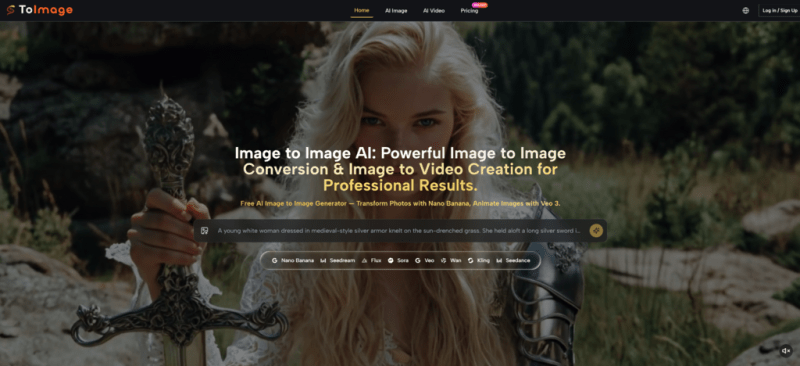
The interface is designed around a simple premise: upload once, prompt once, and then choose which engine to apply. The prompt field remains populated, and the reference image stays loaded, so switching from Nano Banana to Flux to Seedream takes a single dropdown selection and a click. The outputs are displayed sequentially, but the history panel retains all previous generations, allowing for visual back-to-back comparisons even after the session moves on.
Step 1: Upload a Single Source Image
The starting point is identical to any other session. An image is dragged into the upload zone—in this test, a headshot portrait with mixed lighting and a neutral background. The platform accepts the file without resizing or compression, preserving the original quality.
Preparing the Reference
For the iteration test, only one reference image was used to isolate the model differences. However, the platform also supports up to four references for consistency-focused projects. The upload step takes under five seconds, and the thumbnail confirmation provides immediate feedback.
Step 2: Write a Prompt and Run Multiple Models
The prompt was kept deliberately simple to highlight model behavior: “convert to a cinematic film still with warm golden-hour lighting, shallow depth of field, and a contemplative mood.” No stylistic constraints were added beyond that. With the prompt in place, the first model—Nano Banana—was selected and generated. The output showed strong detail retention in facial features and a natural color shift toward warm tones, but the background blur was slightly uneven.
Without changing the prompt or re-uploading, the model selector was switched to Flux. The second generation produced a more uniform depth-of-field effect and a richer contrast, but the skin texture appeared slightly smoothed compared to Nano Banana. A third generation using Seedream delivered the fastest result—under ten seconds—with a more dramatic color grading, but some fine details like eyelashes and hair strands were less defined.
Side-by-Side Output Comparison
The history panel listed all three generations with timestamps and model labels. By toggling between them, it became clear that Nano Banana offered the best balance of detail and mood, while Flux provided the most cinematic blur. Seedream was the quickest but required more post-editing. This comparative insight, gathered in under two minutes, would have taken at least fifteen minutes across separate platforms. The ability to compare directly informed the final choice: Nano Banana was selected for the primary deliverable, but Flux was noted as a backup for a variant that needed stronger background separation.
Step 3: Select and Refine the Best Result
With a preferred output identified, the platform allows further refinement using the same model or a different one. In this case, the Nano Banana result was re-prompted with a minor adjustment: “slightly warmer, add a subtle lens flare.” The refinement generated a new version that incorporated the feedback while preserving the original composition. This iterative loop, supported by the model-switching capability, demonstrates that the platform is not just about choosing a model once—it is about fluidly moving between models as the creative direction evolves.
A Real-World Iteration Test: Brand Visual Identity
To test the iteration framework in a more applied setting, a brand team scenario was simulated. The task was to generate a series of hero images for a wellness brand across three different moods: serene, energetic, and earthy. Each mood required a distinct color palette and lighting approach. Using the same base image of a wellness product, the prompt was adjusted for each mood, and for each prompt, three models were run. The outputs were then reviewed together, and the model that best captured each mood was selected for final production. The entire process—from initial upload to final selection for all three moods—took approximately twelve minutes. Without the comparative interface, the same process would have required managing three separate logins and manually aligning prompts across platforms, easily exceeding forty minutes.
Comparing Iteration Speed Across Single-Model and Multi-Model Workflows
| Dimension | Multi-Model Switching Workflow | Single-Model Commitment Workflow |
|---|---|---|
| Time to First Comparison | One upload, one prompt, three results in under two minutes | One result per session; must re-upload for each model |
| Decision Confidence | Direct visual evidence across models | Relies on memory or external screenshots |
| Prompt Consistency | Identical prompt applied across all models | Risk of typo or variation when re-entering |
| Refinement Speed | Refine selected model instantly | Must switch tool to refine if model is suboptimal |
| Collaboration Fit | Easy to share comparative results with clients | Harder to justify model choice without side-by-side |
| Creative Exploration | Encourages trying uncommon models for each task | Discourages experimentation due to switching cost |
Limitations and Variability
The iteration advantage is real, but it is not infinite. The quality of comparison depends on the prompt quality—a vague prompt produces similarly vague outputs across models, making differentiation difficult. Additionally, not all models are equally suited for every task; some may produce artifacts that are obvious on close inspection, while others may hide errors in smooth gradients. The platform does not automatically highlight these issues; users must rely on their own visual judgment. Generation times vary, with Seedream being significantly faster than Nano Banana or Flux, so the “speed” of iteration is not uniform. The platform does not offer automated scoring or quality ranking; the comparison is entirely manual. For high-volume production where dozens of models need to be tested, the manual comparison may still become a bottleneck. However, for the typical creative session involving two to four model evaluations, the workflow is markedly more efficient than the alternative.
Who This Works Best For
This iterative, comparison-driven approach is ideal for creative directors, art buyers, and designers who need to validate visual directions quickly. Agencies that present options to clients will appreciate the ability to show variations from different models without the overhead of separate invoices or tool explanations. Independent creators who are still learning which model suits their style will find the platform a low-risk environment for exploration. It is less suited for users who have already committed to a single proprietary workflow and have optimized their prompts specifically for that engine, as the comparative benefit may be marginal. For the majority of professionals who face diverse briefs and tight deadlines, however, the ability to evaluate multiple engines side-by-side, without leaving the creative flow, offers a practical edge that translates directly into better final outputs. AI Image to Image turns model selection from a one-time decision into an ongoing, informed part of the creative process.